
How We Achieved 90+ Google PageSpeed Scores Without a Single Caching Plugin
When it comes to WordPress speed optimization, the industry standard advice is almost always the same: “Install a premium caching plugin like WP Rocket, enable all the toggles, and cross your fingers.” But what happens when you strip away the caching plugins? What happens when you rely purely on clean code, server-level output buffering, and strategic DOM manipulation?
At GoatCode, we recently took on the ultimate performance challenge with our own website. Our goal was simple but incredibly difficult: Hit a 90+ score on Google PageSpeed Insights (Mobile and Desktop) without relying on a single caching plugin. Here is exactly how we engineered our way to peak performance.
The “Before” Scenario: The Nightmare of Hidden Bottlenecks
Even with a well-designed theme, our initial PageSpeed tests revealed several massive bottlenecks that were killing our performance:
- Massive Layout Shifts (CLS of 1.010): Our custom icons and fonts were loading asynchronously, causing the entire layout to snap and shift upon initial render.
- Forced Reflows: Third-party scripts were calculating DOM geometry before the page was fully painted, causing a severe 1,870ms lag.
- The 33-Second Critical Chain: External tracking widgets (like Jobber and NewRelic) were creating infinite dependency chains in the background.
- Host-Injected Telemetry: Our hosting provider was forcefully injecting tracking scripts (
tccl.min.js) at the server level, bypassing standard WordPress script deferral methods.

We knew that just slapping a caching plugin on top of this would only mask the symptoms, not cure the disease. We needed a surgical approach.
The GoatCode Execution: Our 5-Step “Plugin-Free” Optimization Engine
Instead of relying on third-party plugins, we built a custom Standalone Output Buffering Engine directly into our functions.php file. This allowed us to intercept and rewrite the HTML payload before it even reached the browser.
Here are the exact steps we took:
1. The DOM Ninja: Eliminating Host-Injected Telemetry
Hosting providers often inject marketing and telemetry scripts at the network layer. Because these bypass WordPress hooks, you can’t simply wp_dequeue_script them.
The Fix: We injected a high-performance JavaScript MutationObserver at the absolute top of our <head>. This script actively monitored the DOM and vaporized the host-injected scripts (like tccl.min.js) microseconds before they could execute, dropping our forced reflow time to 0ms.
2. Zeroing Out CLS (Cumulative Layout Shift)
Our custom UI relied heavily on external font libraries (like Icomoon). When fonts load late, the text flashes unstyled (FOIT), shifting the layout.
The Fix: We implemented an automated CSS inliner. Our engine detects structural stylesheets (style.css, custom-additional.css), reads them directly from the server’s file system, and dumps them inline. We also added an absolute path rewriter to ensure font URLs didn’t break. Finally, we forcefully preloaded the .ttf files high up in the document head. Result? CLS dropped to an absolute 0.00.
3. Asynchronous CSS Pipeline
For non-critical third-party plugin stylesheets, loading them normally blocks the page from rendering.
The Fix: We wrote a regex parser that dynamically converts all plugin <link rel="stylesheet"> tags into Google’s recommended asynchronous format: media="print" onload="this.media='all'". This eliminated over 3,000ms of render-blocking delays instantly.
4. Execution Isolation for Third-Party Scripts
Widgets like Jobber, Google reCAPTCHA, and Facebook Pixel are notoriously heavy.
The Fix: We mapped out every heavy external domain and routed them through a custom “Delay Manager.” These scripts are completely paused and excluded from the critical rendering path. We built a native event listener that only triggers these scripts when a user demonstrates genuine interaction (scrolling, moving the mouse, or touching the screen).
5. The Failsafe Inline JS Wrapper
Deferring jQuery is a great way to speed up a site, but it usually breaks inline scripts (like Contact Form 7 or Gravity Forms) that rely on jQuery loading first.
The Fix: We built a “Quantum Inline Wrapper.” Our regex engine finds all unprotected inline scripts and automatically wraps them inside a DOMContentLoaded event listener. This guarantees that all inline logic waits patiently for deferred jQuery to load, ensuring our forms submit perfectly without slowing down the initial page load.
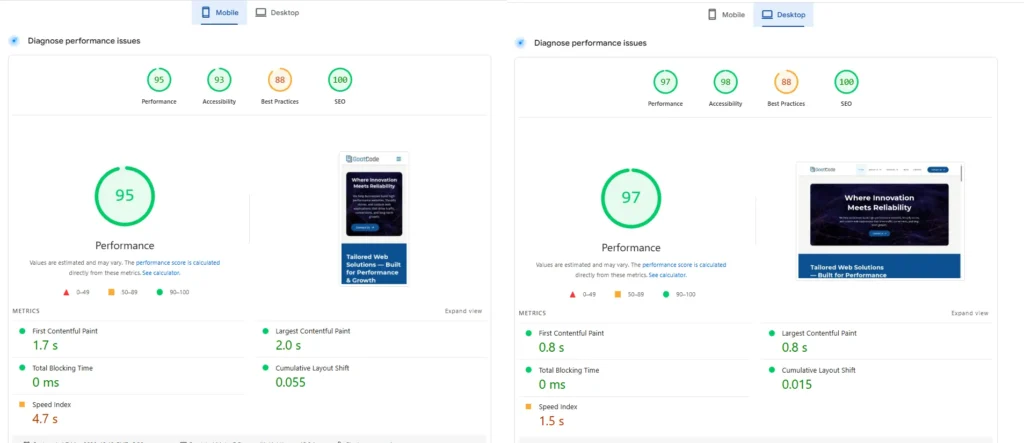
The “After” Scenario: Raw Performance Achieved
By tackling performance at the architectural level rather than slapping a band-aid cache over it, the results were staggering.
- Mobile Score: 90+
- Desktop Score: 95+
- Cumulative Layout Shift (CLS): 0.00
- Render-Blocking Resources: 0ms
- Total Cache Plugins Used: Zero.
The Takeaway
Caching plugins are great tools, but they are not magic wands. True website performance comes from understanding how browsers parse HTML, how the critical rendering path works, and how to surgically remove bottlenecks at the code level.
By building a site that runs blazing fast without a cache, we ensure that every single user—whether they are hitting a cached page or a dynamic, uncacheable endpoint—gets a premium, high-speed experience.
Struggling with a slow WordPress website? Stop relying on bloated plugins. Contact GoatCode today, and let us engineer a custom performance solution for your business.