
Git version Control Unlocked: The Secret Weapon Every Developer Should Master
Have you ever worked on a project where code changes became messy, files were overwritten, or a small update accidentally broke something important?
This is exactly why Git has become one of the most important tools in modern software development.
Git is more than a version control system. It helps developers track changes, collaborate safely, manage features, fix bugs, and deploy projects with confidence.
Whether you are a beginner, freelancer, agency developer, or part of a large development team, learning Git can completely improve the way you work.
If you’re building modern applications or managing client projects, using Git properly is just as important as writing clean code.
It plays a critical role in professional web development workflows where multiple developers collaborate on the same project.
Table of Contents
- What Is Git?
- Why Git Matters for Developers
- How Git Improves Development Workflow
- Important Git Concepts
- Real Example of Git in Action
- Popular Git Workflows
- Git Integration and Automation
- Migrating to Git
- Git FAQs
What Is Git?
Git is a distributed version control system that allows developers to track every change made in a project.
Instead of saving multiple copies of files or worrying about losing work, Git keeps a complete history of your code.
With Git, developers can work on different features, test changes, fix bugs, and return to previous versions whenever needed.
This makes development safer, faster, and more organized.
Git is widely used across platforms like GitHub, GitLab, and Bitbucket.
Why Git Matters for Developers
Modern development is rarely a one-person task. Designers, developers, testers, and project managers often work together.
Without a proper version control system, collaboration can become confusing and risky.
For agencies and teams working on multiple client projects, Git ensures smooth collaboration and prevents costly mistakes.
This becomes even more important when handling platforms like Shopify development or WordPress development, where frequent updates, testing, and deployments are common.
Git helps developers:
- Track every code change clearly
- Work on new features without disturbing the main project
- Collaborate with teams using platforms like GitHub, GitLab, and Bitbucket
- Recover old versions when something goes wrong
- Maintain a cleaner and more professional development workflow

How Git Improves Development Workflow
1. Better Team Collaboration
Git allows multiple developers to work on the same project without overwriting each other’s work.
Each developer can work in a separate branch and merge changes only when they are ready.
2. Organized Code Management
Every Git commit works like a checkpoint. It shows what was changed, when it was changed, and why it was changed.
This makes debugging and project tracking much easier.
3. Faster Feature Development
Developers can build different features at the same time using feature branches.
This speeds up development and keeps the main codebase stable.
4. Safer Error Recovery
Mistakes happen in every project. With Git, you can roll back to a stable version instead of losing hours of work.
This is one of the biggest reasons developers rely on Git every day.
If you are managing multiple environments such as development, staging, and production, Git workflows become essential.
They help ensure safe deployments and reduce downtime, especially when combined with automation and CI/CD pipelines.
Important Git Concepts Every Developer Should Know
Repository
A repository, also called a repo, is the place where your project files and Git history are stored.
Branching
Branches allow developers to work on new features, experiments, or fixes without affecting the main codebase.
Common Git branches include:
- Main branch: Stable production-ready code
- Feature branch: New functionality under development
- Hotfix branch: Urgent fixes for live issues
- Release branch: Final testing before deployment
Commits
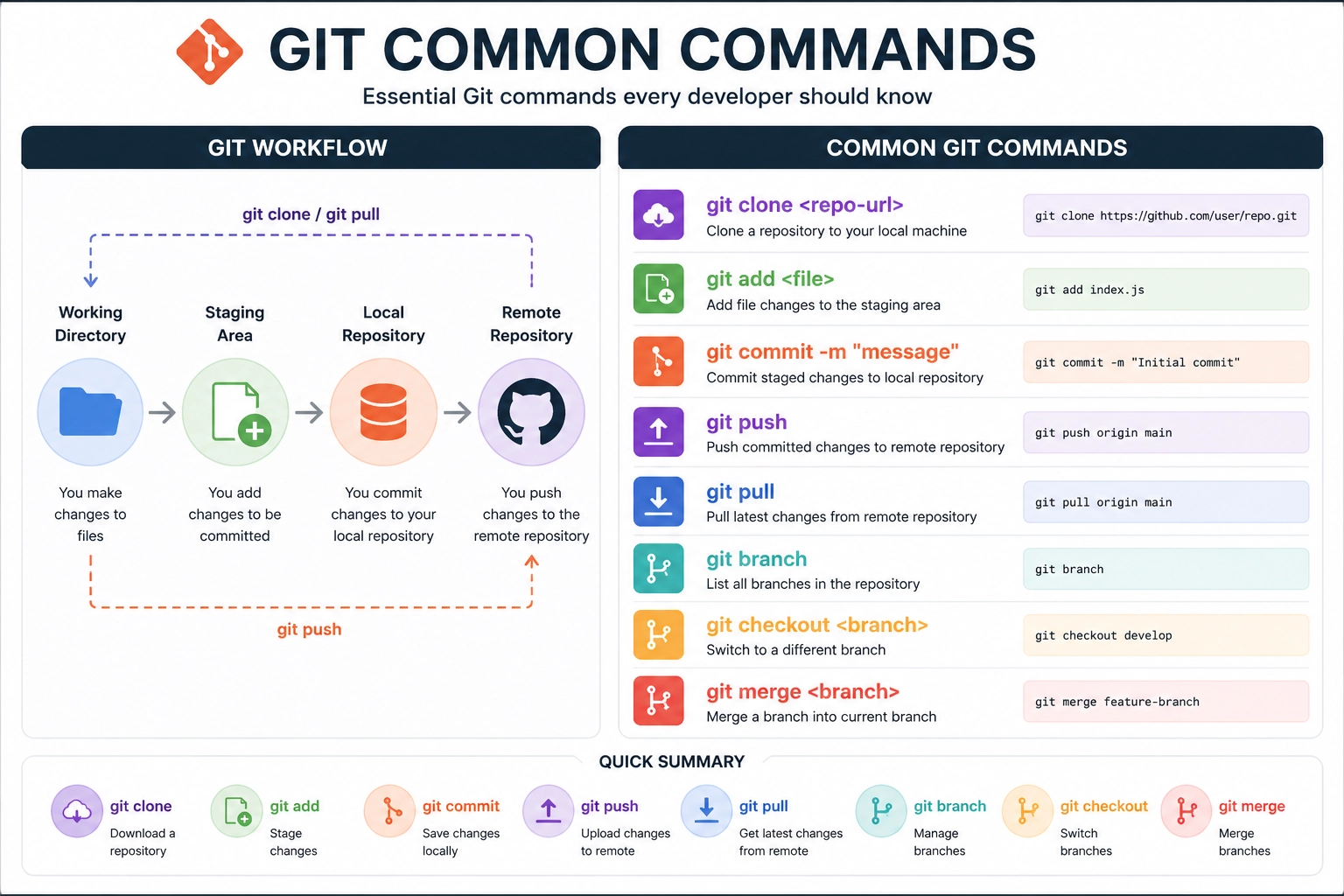
A commit is a saved snapshot of your project at a specific point in time.
Good commit messages help teams understand what changed and why.
Merging
Merging means combining changes from one branch into another.
For example, once a feature is complete, it can be merged into the main branch.
Real Example: How Git Prevents Costly Production Errors
Imagine deploying changes to a live website and something breaks.
Without Git, fixing this could take hours because the team may not know exactly what changed.
With Git, developers can review recent commits, identify the issue, and roll back to a stable version when needed.
This is why professional development teams rely on structured workflows and version control when delivering client projects through scalable web solutions.
As developers, we’ve seen projects become difficult to manage without proper version control.
Git acts as a safety layer that protects your work, improves collaboration, and keeps your codebase clean.
Popular Git Workflows You Should Know
Different teams use different Git workflows depending on project size, release process, and team structure.
- Feature Branch Workflow: Best for small to medium teams
- Git Flow: Useful for structured releases and larger projects
- Trunk-Based Development: Good for fast-moving teams with strong testing
- Agile Git Workflow: Flexible for sprint-based development
Choosing the right Git workflow helps reduce conflicts, improve code quality, and keep releases more predictable.
Git Integration and Automation
Git becomes even more powerful when connected with automation tools.
Many teams use Git with CI/CD pipelines to automatically test, build, and deploy code.
Git automation can help with:
- Running automated tests after every commit
- Deploying approved changes to staging or production
- Reducing manual deployment errors
- Improving software release speed
For agencies and development teams, Git automation saves time and creates a more reliable delivery process.
Teams that use Git properly release faster, make fewer mistakes, and maintain cleaner codebases compared to teams without structured workflows.
If you’re also working on improving performance and stability, you should explore strategies for optimizing your code and deployment process.
These improvements often go hand in hand with proper Git usage.
Migrating to Git from Older Systems
If your team is still using older version control systems like SVN, migrating to Git can improve flexibility and performance.
Benefits of Git migration include:
- Better team collaboration
- Faster development workflows
- Improved code history tracking
- Flexible branching and merging
- Stronger integration with modern development tools
With proper planning, Git migration can be smooth, secure, and low-risk.
Why Developers Love Git
Developers love Git because it gives them control over their work.
It reduces confusion, protects code, improves teamwork, and supports modern deployment processes.
Once you understand Git basics, it becomes an essential part of your daily development workflow.
Frequently Asked Questions About Git
Is Git hard to learn?
Git basics are not hard to learn. Once you understand repositories, branches, commits, and merging, Git becomes easier with practice.
Can beginners use Git?
Yes. Beginners should learn Git early because it helps them manage projects professionally from the start.
What is the difference between Git and GitHub?
Git is the version control system. GitHub is a platform that hosts Git repositories and helps teams collaborate online.
Why is Git important for development teams?
Git helps teams work together safely, track changes, manage features, fix bugs, and reduce deployment risks.

Need Help Setting Up Git or Improving Your Workflow?
Whether you’re a solo developer or managing a team, setting up Git correctly can save time, reduce errors, and improve your overall development process.
At GoatCode, we help businesses implement structured workflows, automate deployments, and build scalable systems using modern development practices.
Get in touch with our team and streamline your development workflow today.